April 2025 Retrospective
Introduction
In April 2025, as I added new features to the vision system and maintained and improved existing ones, I ran into two problems that had a direct impact on real user experience.
- Axios duplicate call problem – Unnecessary API calls during auto-login caused increased network overhead.
- AUM graph performance degradation – Heavy time-series data processing caused rendering delays when entering the page and applying filters.
In this retrospective, I want to document how I identified and analyzed each problem, and what approach I took to solve it.
(If you know a better approach, I'd genuinely appreciate hearing about it in the comments!) 😊
April was largely focused on implementing user permission-related features, but I'll cover those in detail in the May retrospective.
April Action Points
Looking back over Q1, I wrote up April action points — and I actually followed through on four of them. The rest are saved in my curiosity notebook; I plan to work through them during May's holidays.
- Fundamentally resolve 2+ real-world problems encountered at work
- Organize Git docs and prepare + share a session on merge vs. rebase
- Set up a container auto-deploy pipeline to EB using backend CI/CD
- Compile insights connecting FSD's Public API approach to bundlers
- Write up a precise summary of the HTTP transport layer
- Document client-side security (XSS and CSRF attacks)
- Write Part 2 of the FSD adoption post
- Study object-oriented programming
- Start learning functional programming
Main Content
Fixing the Axios Duplicate Call Problem
Problem Overview
After implementing auto-login, the following problem surfaced:
- Symptom: When an access token expired, multiple APIs simultaneously returned 401 errors
- Result: Each request simultaneously called the refresh API → duplicate calls occurred
- Real impact: Increased server load, higher risk of user logout, degraded UX
The original code looked like this:
// axiosConfig.ts
...
 if (error.response.status === STATUS.UNATHORIZED) {
      if (error.response.data.message === ERROR_RESPONSES.accessExpired) {
        if (!session?.refresh_token) {
          resetSession();
          return Promise.reject(new Error('No refresh token available'));
        }

        try {
          const reissuedResult = await authApi.reissueToken(session.refresh_token);
           return instance({
            ...config,
            headers: {
              ...config?.headers,
              Authorization: `Bearer ${reissuedResult.access_token}`,
            },
          });
        } catch {
          ...
        }

      }
 }
 ...
Checking the console, I could see this:
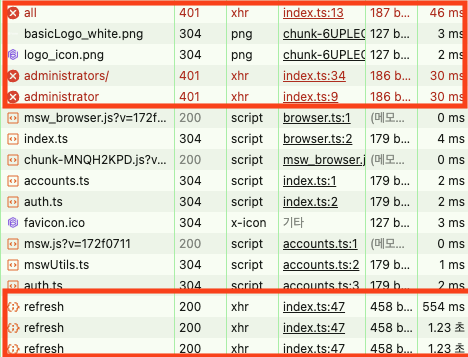
Three API requests each returned a 401, and sure enough, there were three separate refresh calls.
Temporary Fix: Using react-router-dom + tanstack-query loaders
While researching this problem, the first thing that came to mind was leveraging react-router-dom and tanstack-query.
The loader method used with react-router-dom's createBrowserRouter API is a function that pre-fetches data before a route renders — useful for improving user experience. The key insight here was that it can execute an API call before any of the APIs called at the page level.
So I tried a temporary fix by adding one API call to the AuthLayoutLoader class that pre-fetches the current user's info.
//route.tsx
export const router: ReturnType<typeof createBrowserRouter> = createBrowserRouter([
  {
    path: publicPathKeys.root,
    element: <DefaultLayout />,
    loader: DefaultLayoutLoader.AuthLayoutPage,
    errorElement: <GlobalErrorFallback />,
    children:[
      ...
    ]
  },
  {
    path: privatePathKeys.root,
    element: <AuthLayout />,
    loader: AuthLayoutLoader.AuthLayoutPage,
    errorElement: <GlobalErrorFallback />,
    children:[
      ...
    ]
  }])


// auth-layout.model.ts

export class AuthLayoutLoader {
   const { session, setSession, resetSession } = useSessionStore.getState();
  static async AuthLayoutPage(args: LoaderFunctionArgs) {
    const session = AuthLayoutLoader.getSession();
    if (!session) {
      return redirect(publicPathKeys.login());
    }
    await AuthLayoutLoader.fetchMyInfo();
    return args;
  }

  private static async fetchMyInfo() {
    const userInfoQuery = {
      queryKey: ['me'],
      queryFn: () => authApi.getMyInfo(),
    };

    const result = await queryClient.fetchQuery(userInfoQuery);
    return result;
  }

  private static getSession() {
    return useSessionStore.getState().session;
  }
}
By using fetchQuery (which can surface errors) inside the loader to add a Promise request for the user's own info, the result looked like this:

Adding a check in the data-fetching layer (the loader) before the N downstream requests meant the duplicate call problem was resolved.
But about three days later, this approach revealed its own problems:
- Problem 1: Unnecessary user info queries on every page entry
- Problem 2: Relying on the loader can't handle token expiration that occurs inside components
Because loaders are route-based, they can't respond to token expiration triggered by multiple API calls happening inside components. So I needed to solve this more fundamentally.
Root Fix: Request Queue Management via RefreshManager
Looking around online, I found that people generally use a queue, but there wasn't any clean implementation out there. So I built a RefreshManager class. Its strategy is as follows:
isRefreshingflag — after the first request fires, queue subsequent ones- After token refresh completes — retry all queued requests with the new token
- Abstracted into a class — removes repetitive logic from inside the interceptor
RefreshManager Class Implementation
import { InternalAxiosRequestConfig } from 'axios'

import { CustomInstance } from '@/shared/lib'

type RequestCallback = (token: string) => void

class RefreshManager {
  private isRefreshing = false
  private queue: RequestCallback[] = []

  async handle401(
    config: InternalAxiosRequestConfig,
    refreshFn: () => Promise<string>,
    api: CustomInstance
  ): Promise<InternalAxiosRequestConfig> {
    if (this.isRefreshing) {
      return new Promise((resolve) => {
        this.queue.push((token: string) => {
          config.headers = config.headers || {}
          config.headers.Authorization = `Bearer ${token}`
          resolve(api(config))
        })
      })
    }

    this.isRefreshing = true

    try {
      const newToken = await refreshFn()
      this.queue.forEach((cb) => cb(newToken))
      this.queue = []
      config.headers = config.headers || {}
      config.headers.Authorization = `Bearer ${newToken}`
      return api(config)
    } catch (err) {
      this.queue = []
      throw err
    } finally {
      this.isRefreshing = false
    }
  }
}

export const refreshManager = new RefreshManager()


// axiosConfig.tsx (class instance usage)

 if (error.response.status === STATUS.UNATHORIZED) {
      if (error.response.data.message === ERROR_RESPONSES.accessExpired) {
        if (!session?.refresh_token) {
          resetSession();
          return Promise.reject(new Error('No refresh token available'));
        }

        try {
           const retryResponse = await refreshManager.handle401(
              config,
              async () => {
                const reissued = await authApi.reissueToken();
                setSession({
                  access_token: reissued.access_token,
                  role: reissued.role,
                  token_type: reissued.token_type,
                });
                return reissued.access_token;
              },
              instance,
            );

            return retryResponse;
        } catch {
          ...
        }

      }
 }
Checking the console logs below confirmed the problem was solved at the root:
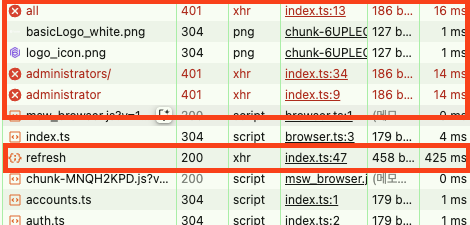
Now, even if multiple APIs simultaneously return 401 errors, only the very first request triggers a refresh.
Before vs. After
| Situation | Before | After |
|---|---|---|
| On 401 error | Each request triggers its own refresh | Single refresh, then all queued requests retry |
| Refresh API calls | N times (once per API request) | 1 time |
| Code complexity | Complex branching inside the interceptor | Abstracted into a class, clean and simple |
Reflection
- Solving this problem reminded me again of the challenges of async state sharing and the limits of Axios interceptors. (In May, I want to build an HttpClient that accepts dependency injection regardless of whether fetch, Axios, or ky is used underneath.)
- When managing auth tokens in a React app, client-side concurrency issues must always be considered.
- I should study mutexes as a general solution to shared-resource problems.
AUM Graph Performance Improvement
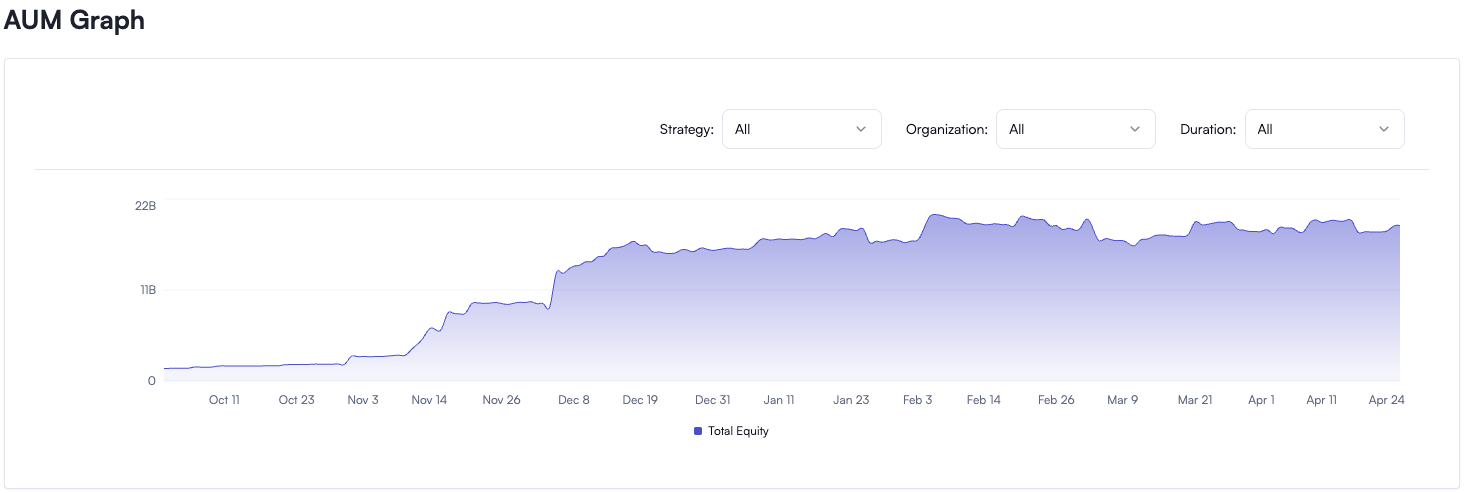
AUM (Assets Under Management) refers to the total market value a financial institution manages on behalf of its clients. This improvement effort focused on optimizing the performance of the overall AUM time-series graph for all clients.
Problem Overview
The page displaying AUM data for all clients had the following issues:
-
1–2 second delay when entering any page that contained the graph
-
Stuttering during rendering when applying filters (strategy / organization / time range)
-
Degraded UX, complaints about sluggish page responsiveness
The performance degradation was visually apparent in the graph shown here:
At some point I started noticing a 1–2 second block whenever I navigated to the page containing this graph or manipulated the filters.
Root Cause Analysis
After examining the Performance and Network panels:
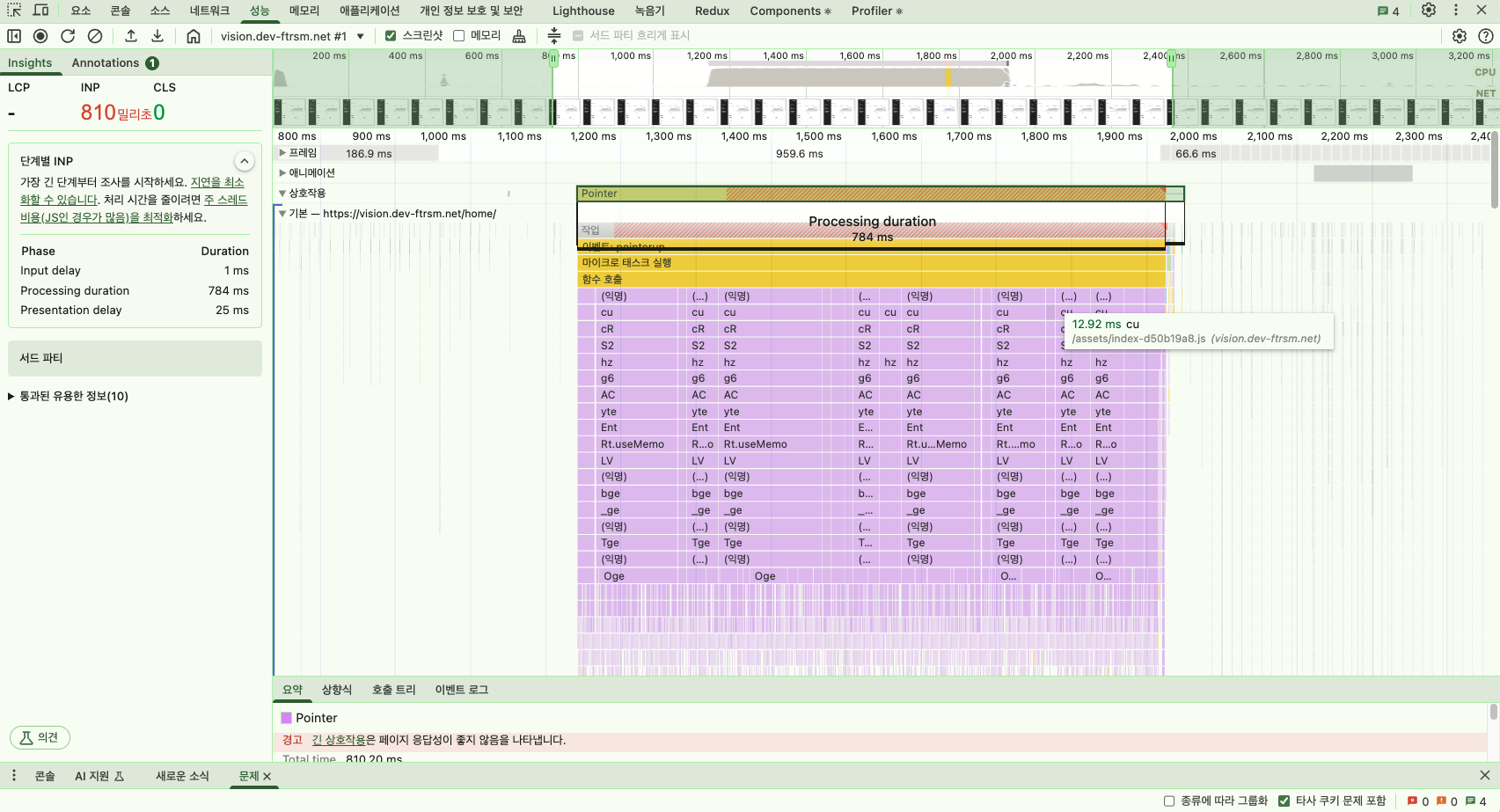
1. API network latency
2. JavaScript blocking
With the causes identified, I tackled them one by one.
1. Switching APIs to cut ~1 second of network latency
A bit of background first. The overall AUM graph state is built by transforming data received from the server on the client side. I figured there was no need for a dedicated graph API at all — there was already an existing API that returned the full account list, so that should have been sufficient.
Previously, the app was fetching the entire account list, caching that data, and then rendering the graph from it. The problem is that each account contains time-series data that accumulates daily, so the data volume grows steadily over time. On top of that, the API had a fair amount of server-side logic baked in.
It wasn't a big deal at first, but as data volume grew, iterating over the full dataset on every filter change or render became an increasingly obvious bottleneck.
Browsing Swagger, I found that about a month prior, someone had built an API for a feature that edits a customer's Equity. That API happened to contain the data needed to render the graph. The response was a simple flat List — though each object's interface was somewhat complex. It didn't satisfy every field the graph needed, but it had the core data, so I tried building the improvement on top of it. The data structure of the state changed in the process, which made things tricky, but it also pushed me to write purer functions and separate out the calculation logic more clearly.
As a result, I was able to cut approximately 1 second of network latency.
Before (full account list API)
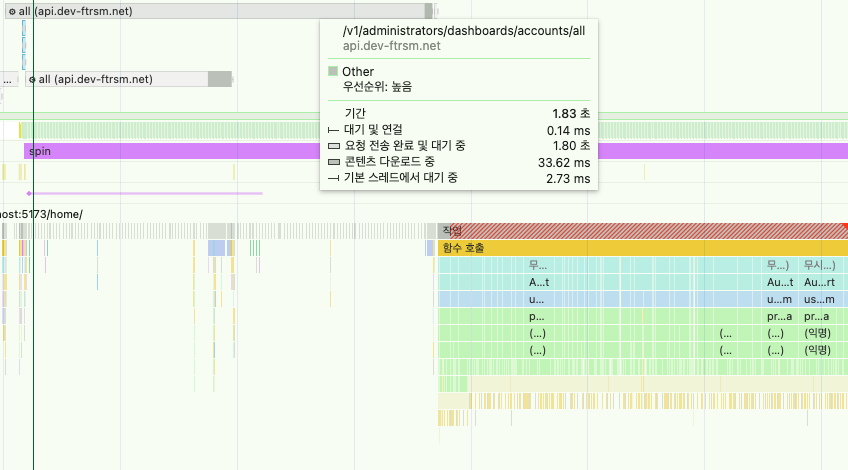
- Decoded body: 1.3 MB
- content-length === 1321701
- Waiting for response: 1.8s
After (historical snapshot API)
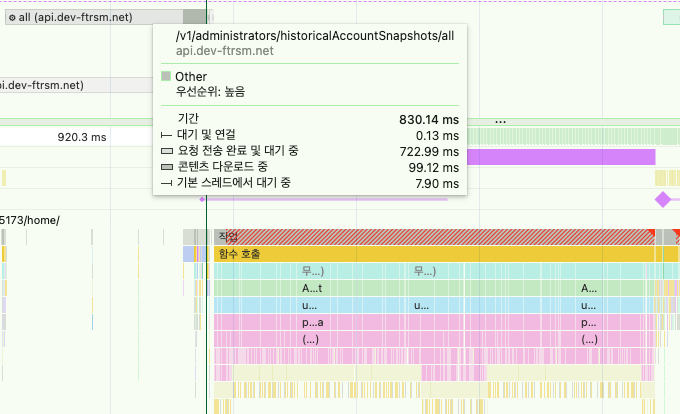
- Decoded body: 5.0 MB
- content-length === 5049472
- Waiting for response: 836.46 ms
| Item | Before | After |
|---|---|---|
| API used | Full account list API | /historicalSnapshot/all API |
| Data structure | Nested (time-series data per account) | Flat List |
| Performance gain | Network latency 1–2s | Network latency 0.8s (~1s improvement) |
With a more appropriate API, the graph rendering improved. Now for the remaining JavaScript blocking issue.
2. Minimizing JavaScript CPU Blocking
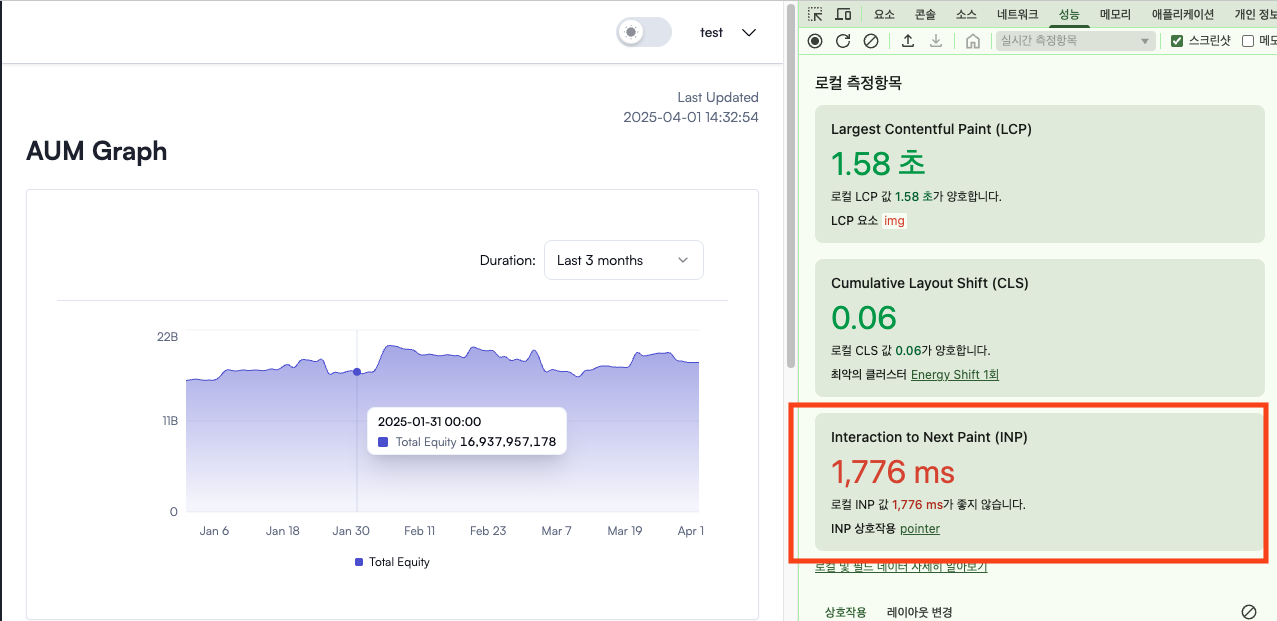
Analyzing the Performance panel, I found that CPU blocking was concentrated around calls to the findMarketInfo() function.
The AUM graph needed to display market data alongside each date, which required a lookup function to find the market entry matching a given date.
The original findMarketInfo function used Array.prototype.find() to linearly scan through the markets array on every call, matching by date — and that repeated linear scan turned out to be one of the main performance bottlenecks.
export const findMarketInfo = ({
  dailiesRowUpdatedTimestamp,
  markets,
}: MarketProp): MarketDto | null => {
  const marketInfo = markets.find((market) => {
    const parseMarketDate = dayjs.unix(market.createdTimestamp).format(DATE_FORMAT_YYYY_MM_DD)
    const parseDailiesDate = dayjs.unix(dailiesRowUpdatedTimestamp).format(DATE_FORMAT_YYYY_MM_DD)

    return parseMarketDate === parseDailiesDate
  })
  if (!marketInfo) return null
  return marketInfo
}

const processAum = () => {
...
    const market = findMarketInfo({
      dailiesRowUpdatedTimestamp: snapshot.updatedTimestamp,
      markets,
    });
...
}
Like this — the scan was running inside the loop that was already iterating to compute AUM state. I replaced it with a hash-based Map and improved the abstraction level of the function.
const createMarketMap = (markets: MarketDto[]): Record<string, MarketDto> => {
  return markets.reduce(
    (map, market) => {
      const marketDate = dayjs
        .unix(market.createdTimestamp)
        .format(DATE_FORMAT_YYYY_MM_DD);
      map[marketDate] = market;
      return map;
    },
    {} as Record<string, MarketDto>,
  );
};
I set it up so that the Map is built just once when the hook runs, enabling O(1) access to market data for any given date.
export const useHistoricalAum = () => {
  const { data: historicalSnapshotList } = useSuspenseQuery(
    SnapShotQueries.getHistoricalAccountSnapshots(),
  );
  const { data: markets } = useSuspenseQuery(MarketQueries.getMarketData());
  const { filters } = useTimeSeriesStore();

  const aumWithMarkets = useMemo(() => {
    const marketMap = createMarketMap(markets);
    const aum = processAumData(historicalSnapshotList, marketMap);
    return enrichAumWithMarkets(aum, marketMap, filters.asset);
  }, [historicalSnapshotList, markets, filters.asset]);

  return {
    aumWithMarkets,
  };
};
With this approach, before processAumData runs, the only upfront cost is converting the List into a Map exactly once.
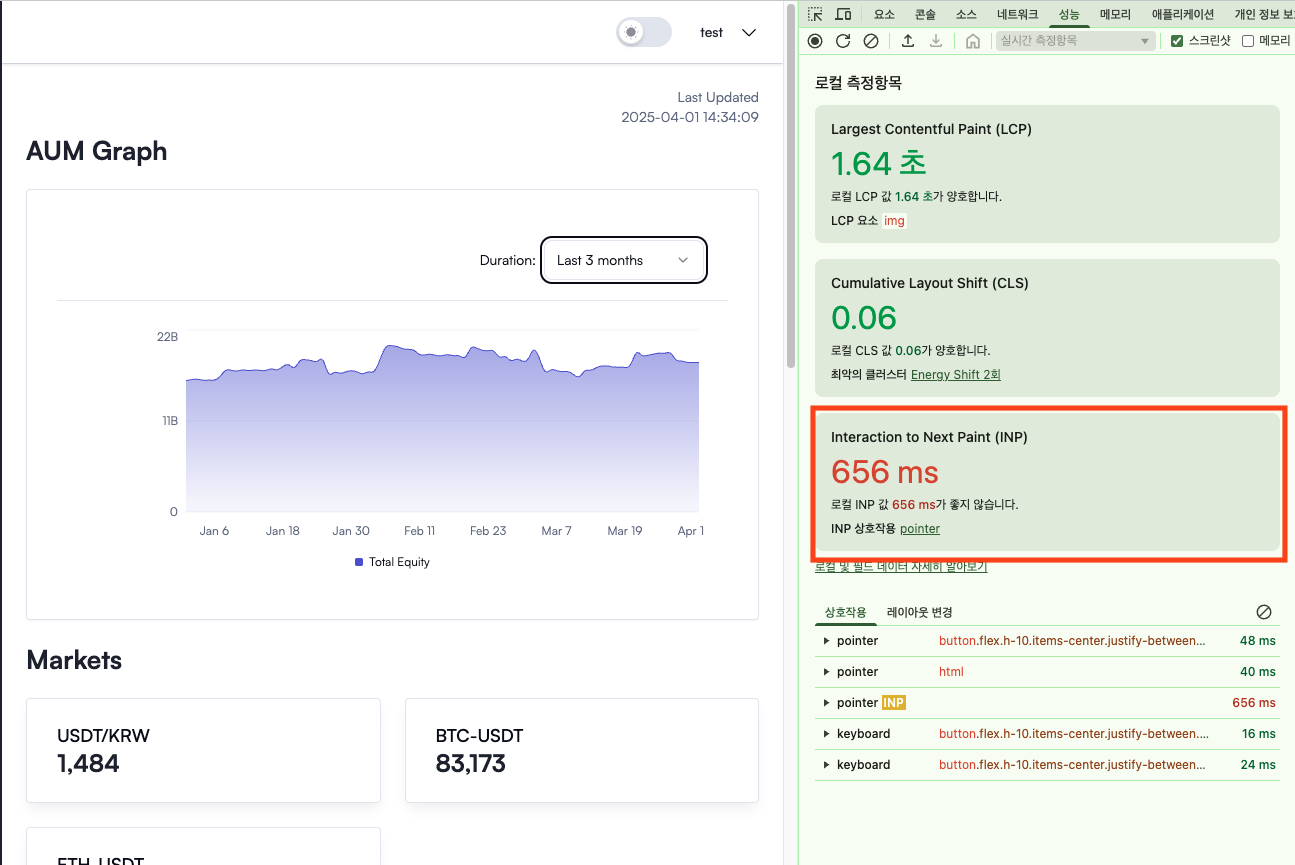
After this fix, the INP on page entry and refresh improved to 0.6s — roughly a 1-second gain.
3. Filtering Optimization with zustand + react-query
The final bottleneck was that the AUM calculation function re-ran on every filter change. Even after optimizing the API switch and the JS-blocking function above, there was still a slight stutter when filtering, because the function had to re-execute. To address this, I moved the filter logic inside the zustand store.
export const useTimeSeriesStore = create<TimeSeriesState>((set, get) => ({
  aums: {},
  filters: {
    strategy: "all", // initial: no filter
    organizationId: "all", // initial: no filter
    asset: "krw",
  },
  setAums: (aumObj) => set({ aums: aumObj }),
  setOrganizationFilter: (organizationId: string) => {
    set((state) => ({
      filters: {
        ...state.filters,
        organizationId,
      },
    }));
  },
  setAssetFiler: (asset) =>
    set((state) => ({
      filters: {
        ...state.filters,
        asset,
      },
    })),
  getFilteredAums: () => {
    // TODO : improvement point I noticed while writing this retrospective... extract the branching logic separately
    const { aums, filters } = get();
    const { strategy, organizationId } = filters;

    if (
      (strategy === "all" || !strategy) &&
      (organizationId === "all" || !organizationId)
    ) {
      return aums;
    }

    const filteredAums: AUM = {};
    Object.entries(aums).forEach(([date, entries]) => {
      const filteredEntries = entries.filter(
        (entry) =>
          (strategy === "all" || entry.strategy === strategy) &&
          (organizationId === "all" || entry.organizationId === organizationId),
      );
      if (filteredEntries.length > 0) {
        filteredAums[date] = filteredEntries;
      }
    });
    return filteredAums;
  },
  setStrategyFilter: (strategy) =>
    set((state) => ({
      filters: {
        ...state.filters,
        strategy,
      },
    })),
}));
I'm honestly not sure whether storing server data from react-query into zustand's client state store is the right approach. But I tried it for a few reasons:
- Filtered data is easier to share across multiple components.
- Keeping state and logic in one place felt like it would improve reusability and consistency.
Final Results
- ✅ Improved response speed when applying filters
- ✅ LCP under 200ms (Google Web Vitals 'Good' threshold)
- ✅ Full logic split into just 3 pure functions
Reference: Google INP Performance Guide
Vision System Maintainability
- What I'm thinking about
- What does "maintainability" actually mean, and how do you build software that's genuinely easy to maintain?
- Knowledge points I think are relevant to answering that question
- OOP
- FP
- Adapter Pattern
How do you all design your frontend for maintainability?
Do you introduce a Mapper layer for server responses?
Conclusion
Writing this Q1 retrospective and pulling out concrete action points really helped — even during a busy month, having them meant I could make incremental progress.
Doing what's asked of you well is important, but there's also something genuinely satisfying about finding and fixing things on your own initiative.
Going through that process, I'm reminded again of how much I still have to learn.
AI can help you write code fast, but I keep coming back to wanting to be the kind of developer who thinks carefully about why every line of code exists — and contributes from that place. That's the commitment I'm renewing today.
Thanks for reading this long post. Keep going, wherever you are!
May Action Points
- Write Part 2 of the FSD blog post
- Apply and study unit/integration testing
- Start learning object-oriented programming
- Refactor toward better encapsulation for maintainability
- Start learning functional programming
- Work on the Next.js side project (fillsLog in progress)
- Document the user permission policy rollout
- Set up a container auto-deploy pipeline to EB using backend CI/CD