February 2026 Retrospective
Introduction
Looking back on February, I ran into a string of unexpected problems — a payment outage that hit during the Lunar New Year holiday, and an authentication sync bug that only showed up in certain browsers. Each time, I made a conscious effort to dig a little deeper rather than just patch and move on.
AI helped me zero in on root causes quickly, which was genuinely useful. But this was also a month that reminded me how easily you can mistake a surface symptom for the real problem — and why continuous learning still matters.
Reflecting on it now, the thinking I had to do through those incidents turned out to be February's most valuable takeaway. Three things stand out from that month.
- Lunar New Year payment outage response — Emergency response to a white-screen issue on the payment completion page in Safari
- Web-to-map authentication sync troubleshooting — Authentication state not reflecting in the map after sign-up, on both Safari and Chrome
- Reducing support inquiries through a UI proposal — Spotting a user pain point as a developer and cutting web inquiries with a small UI change
Before diving into each issue, I want to briefly describe the current state of the OpenDoctor web app — it'll make the problems a lot easier to follow.
The Current State of OpenDoctor Web
OpenDoctor Web is in the middle of a migration from Flutter-web to Next.js. That migration was the common thread behind all three issues.
The current architecture, simplified, looks like this:
- Next.js wraps everything as the outer parent iframe.
- Flutter-web sits inside Next.js as a child iframe.
- A React component lives inside Flutter-web as its own child iframe.
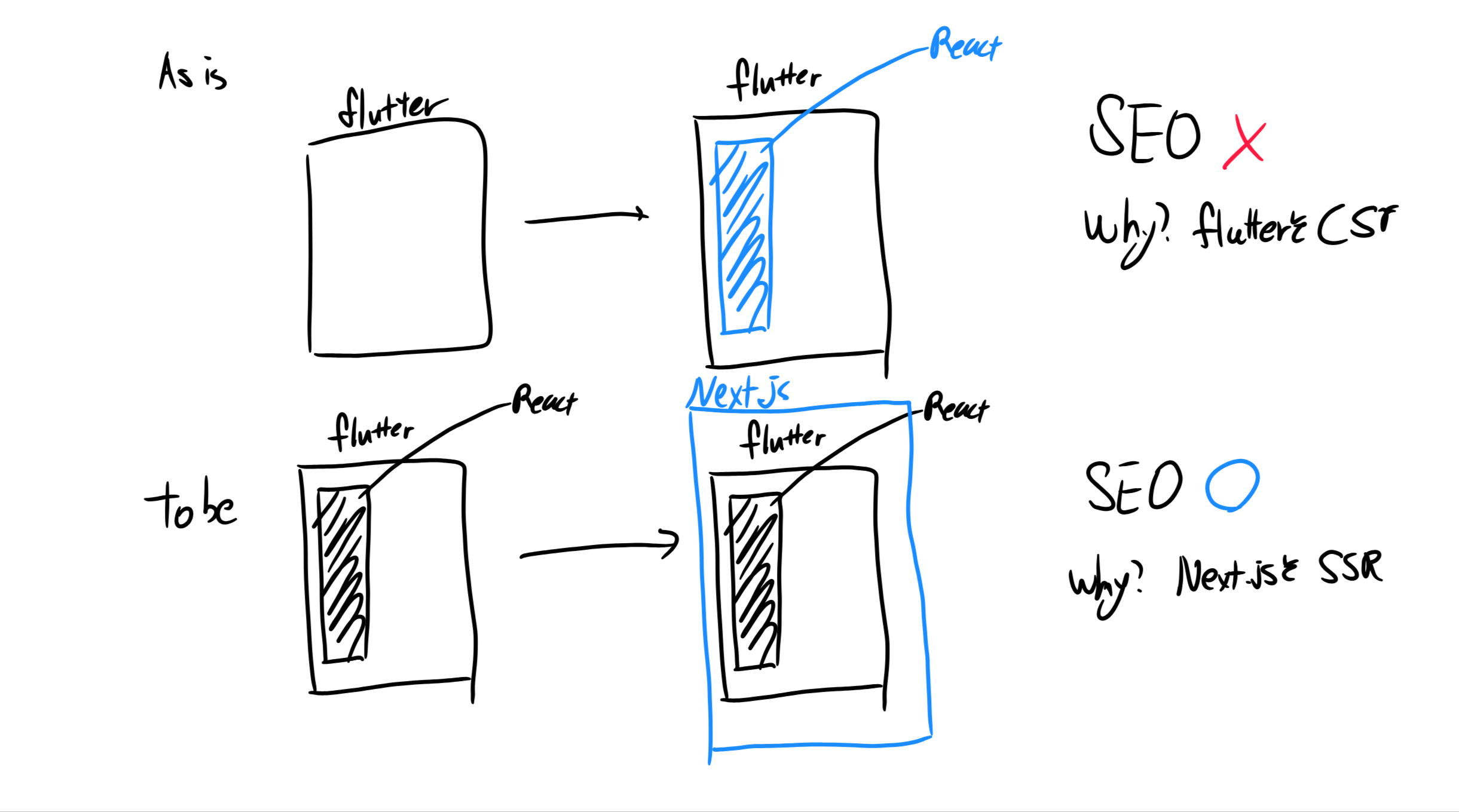
What used to be Flutter-web <-> React has become Next.js <-> Flutter-web <-> React, as shown in the diagram above.
The upside of this structure is that we can pursue SEO incrementally in parallel. The plan is to build out Next.js components domain by domain and swap them in piece by piece.
But there are real difficulties too. Even a single feature requires thinking about many more moving parts — browser history stacks and cross-frame interactions, for example. And above all else... cross-browser compatibility. We built this environment using iframes and the PostMessage API, and messages simply not arriving in Safari was something we ran into over and over.
Safari's ITP (Intelligent Tracking Prevention) policy restricts storage, cookies, and navigation inside iframes far more aggressively than Chrome does. Code that ran perfectly in Chrome would silently stop working in Safari at these boundaries — and that kind of silent failure was the hardest to deal with. It turned out to be the root cause behind the issues I'll walk through below.
With that context in place, here's a quick look at each of the three problems and how we resolved them.
1. Payment suddenly stops working on Lunar New Year?!
First — what is an OpenDoctor Report? Let me explain, because it's central to the story. (Feel free to check it out!)
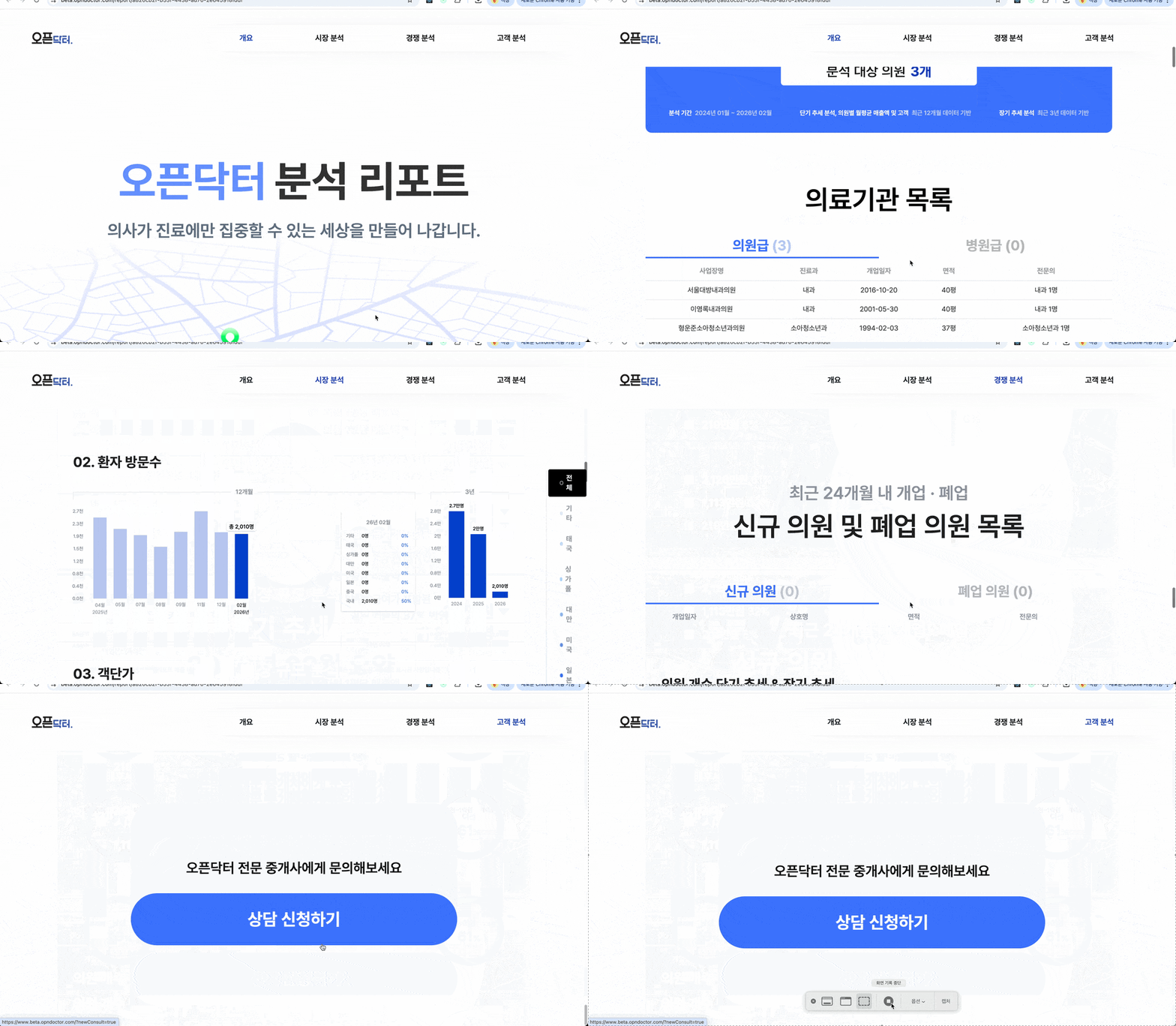
The OpenDoctor Report service is a paid offering that lets users select a clinic location they're interested in and combines relevant data to deliver insights useful for opening a medical practice. Of all the times for something to break — it had to be during the Lunar New Year holiday, when a flood of inquiries came in saying "I paid for a report but I can't see it." Emergency response was necessary, and we handled it two ways.
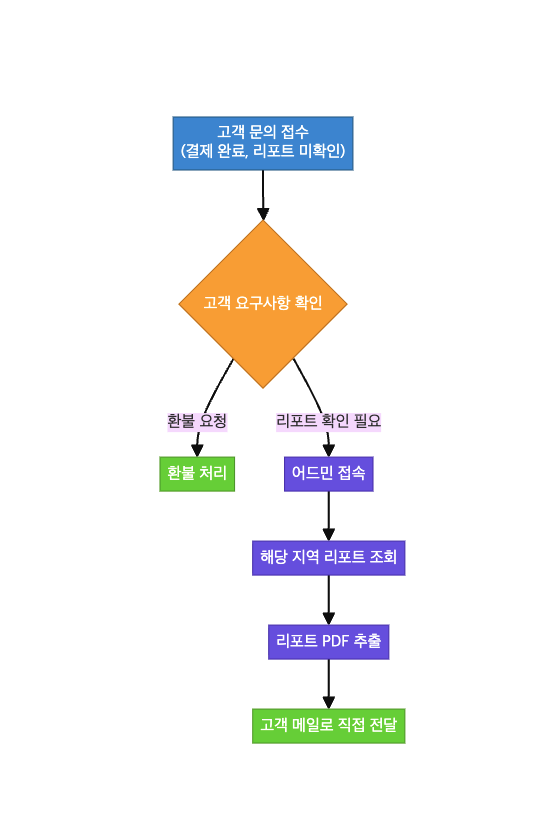
- Customers who paid but couldn't see their report were offered a full refund.
- Customers who absolutely needed the report right away were helped directly: we accessed OpenDoctor Web with admin privileges, exported the relevant regional report as a PDF, and sent it by email.
Identifying the Root Cause
This was a regression introduced by the migration — specifically in the report detail view. In hindsight, you could call it a side effect of migrating. This kind of thing is tricky... even with tests in place, it's hard to catch everything. Part of it may have been that I wasn't thorough enough with my test cases; part of it is that validating third-party SDKs through automated tests is genuinely difficult.
Here's what the UI looked like before and after:
- AS-IS (Flutter-web report detail)
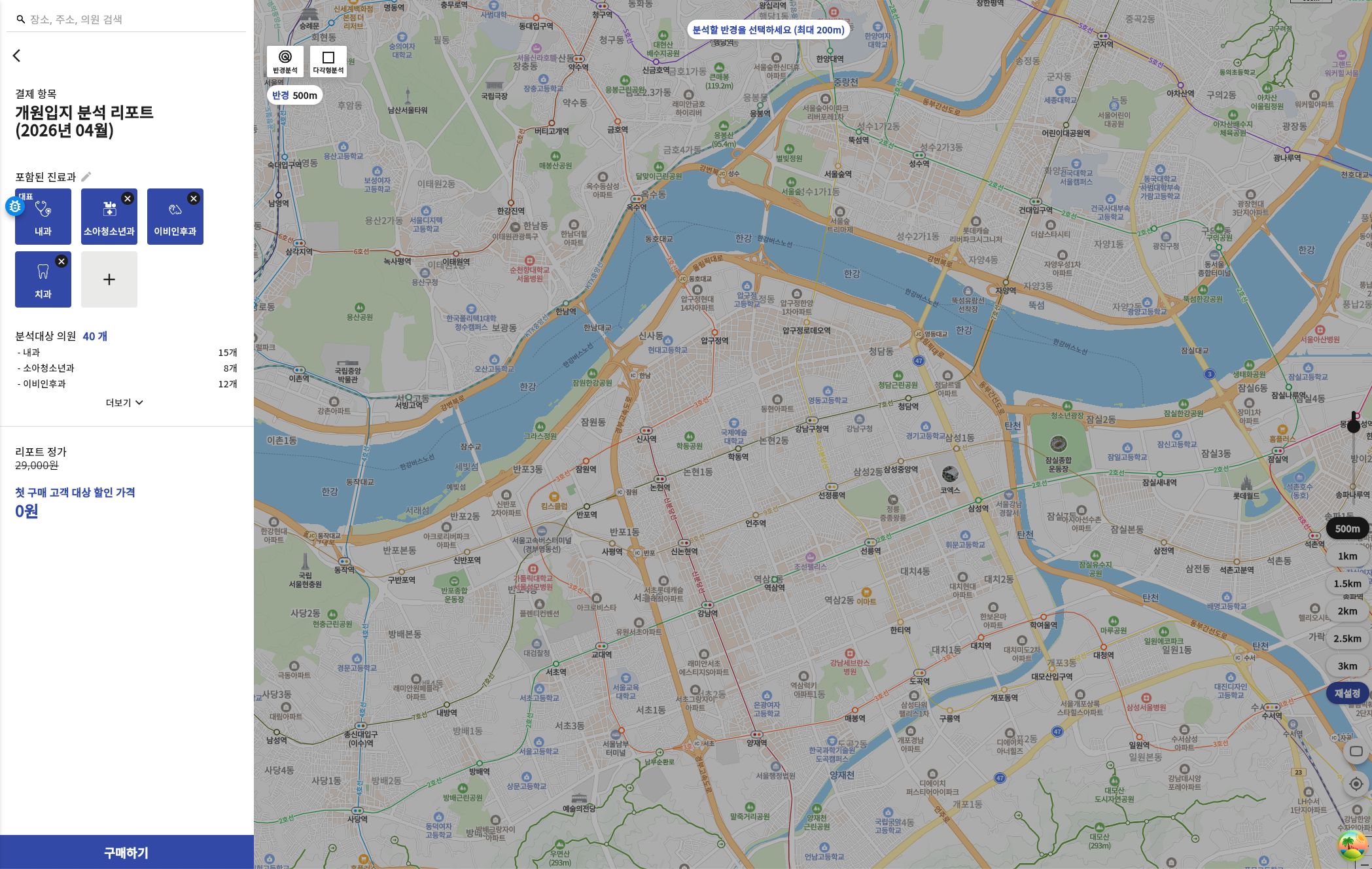
- TO-BE (Next.js report detail)
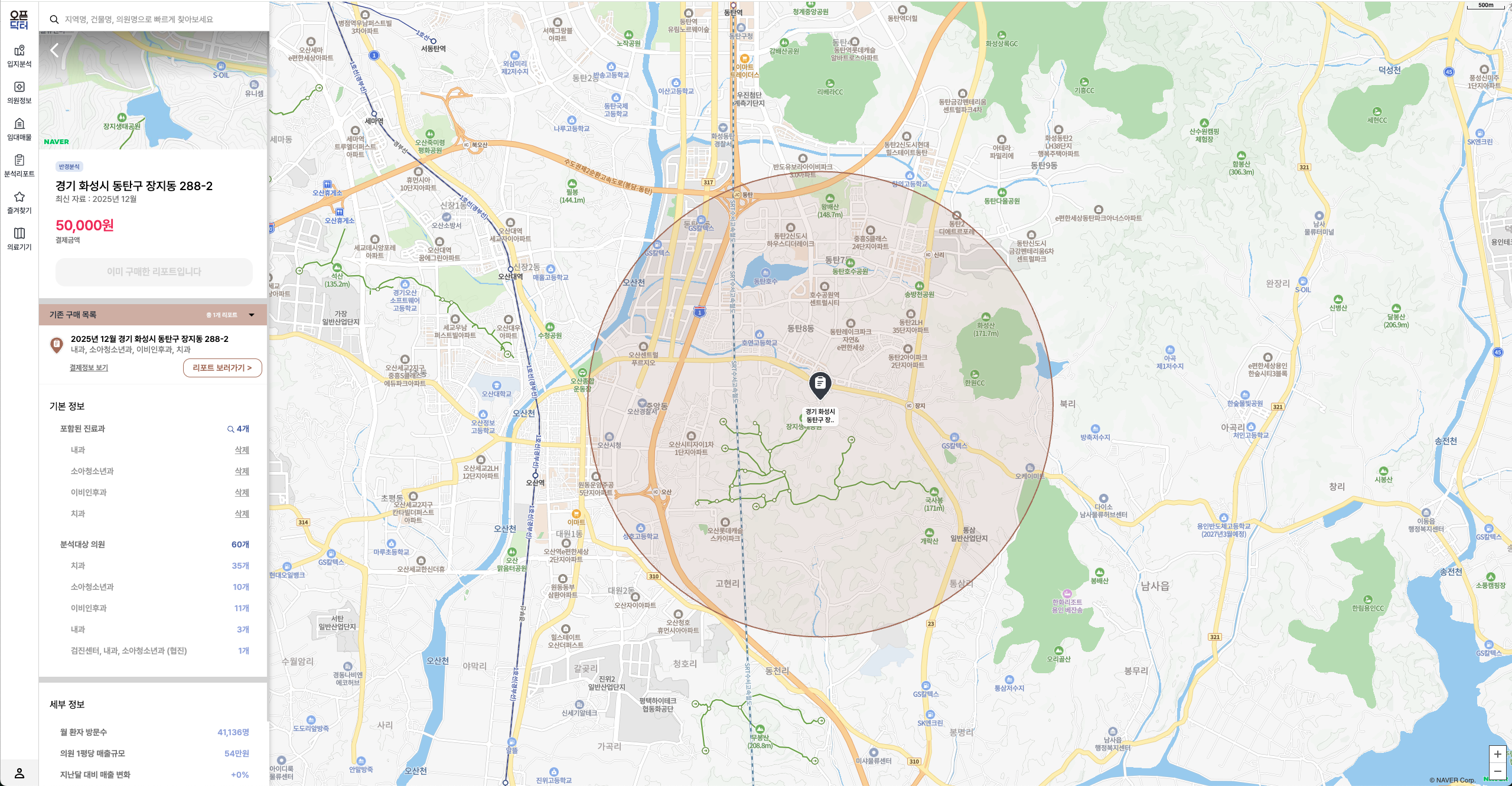
In the urgency of the moment, my first fix was to add a single line to the Flutter-web code that forced navigation to the payment completion page directly:
window.parent.postMessage({ type: "paymentResult", ... }, "*");
window.location.href = uri; // Added forced navigation in Flutter — previously, Next.js was responsible for the redirect
But when I pulled up the commit history while writing this retrospective, the fix was really about shifting which layer owned the navigation responsibility.
- Child (Flutter
iamport.js): On payment success → send result to parent viawindow.parent.postMessage. - Parent (Next.js): On message receipt → navigate to the payment completion page with
router.push('/payment/complete?...').
The parent (Next.js) had owned the navigation logic, but we updated Flutter-web's payment flow to handle the redirect itself.
Flutter-side iamport.js — child now navigates independently:
window.parent.postMessage({ type: "paymentResult", ... }, "*");
// Navigate to Flutter payment completion page (WebTabIamportResult → calls POST /report/region/payment)
window.location.href = uri;
Next.js overlay hook — navigation logic removed from the parent:
- router.push(`/payment/complete?${query.toString()}`);
- router.refresh();
+ // Flutter navigates directly to /payment/complete from iamport.js,
+ // so Next.js only needs to close the payment modal overlay
To really understand why this fix worked, you need to look at when the server actually learns that a payment has been completed.
The server learns about payment completion at the moment Flutter's WebTabIamportResult widget mounts on screen — that's when Riverpod (Flutter's global state management library, comparable to Zustand) activates the postReportPaymentProvider, which fires POST /report/region/payment.
In other words, the server only knows about the payment when that Flutter widget mounts. If the widget never mounts, the server never gets notified — and from the customer's perspective, their money is gone but the report never opens.
2. Signing up on OpenDoctor Web doesn't update the map?
This was a bug discovered a few days after we deployed the sign-up flow to the new OpenDoctor (Next.js). When users signed up or logged in through Next.js, the web itself behaved correctly — but the authentication state wasn't being reflected in the Flutter-web map. We had done QA, and we still missed it. That stung.
Auth state sync between parent and child was broken.
Even when a login happens in Next.js (the parent), the Flutter-web map (the child iframe) needs to be notified before it can operate in an authenticated state. That notification logic did exist — it just wasn't working correctly.
Here's a diagram of what was going wrong:
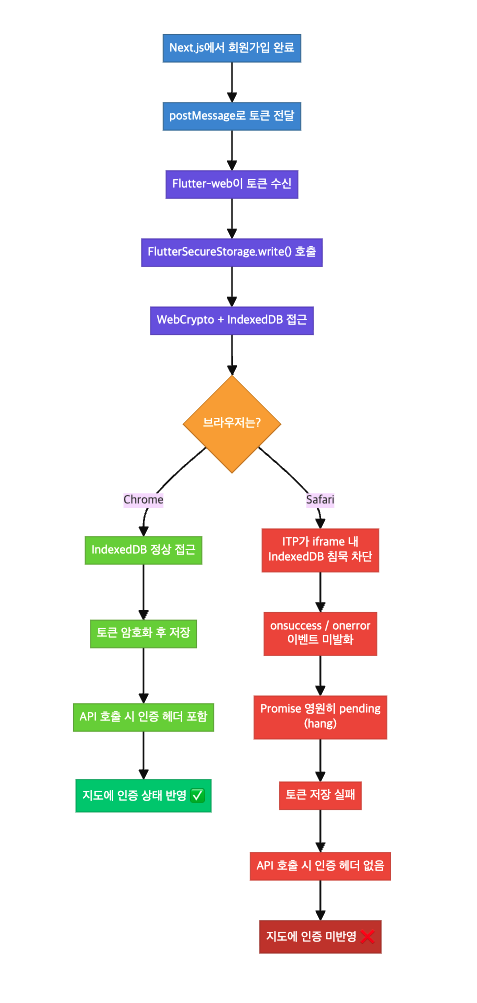
Root cause: FlutterSecureStorage hanging inside a Safari iframe.
Through debugging, I traced the cause to this chain:
- User signs up in Next.js → token sent to Flutter-web via
postMessage - Flutter-web attempts to save the token to
FlutterSecureStorage - The web implementation of
FlutterSecureStorageuses WebCrypto + IndexedDB internally - Safari's ITP partitions third-party IndexedDB access inside iframes
- When
crypto.subtleaccess is blocked, the Promise hangs indefinitely — no resolve, no reject - Result: token save fails → API calls go out without an auth header → map stays unauthenticated
Chrome doesn't restrict third-party storage access inside iframes as aggressively as Safari, which is why the issue didn't reproduce in Chrome.
Fix: Replace FlutterSecureStorage with an in-memory token
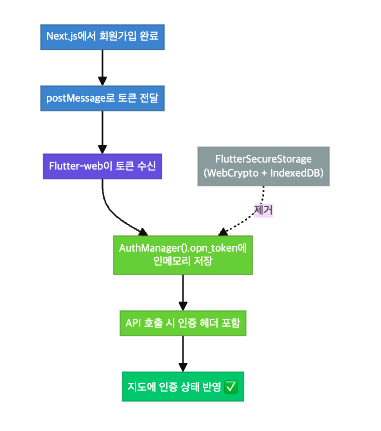
We removed all direct reads from FlutterSecureStorage and switched to reading and writing via AuthManager().opn_token in memory instead.
// Before: hangs in Safari iframe
const storage = FlutterSecureStorage();
var opnToken = await storage.read(key: "OPN_OPNDOCTOR_KEY_AUTH_OPN_TOKEN");

// After: use in-memory token (FlutterSecureStorage can hang in Safari iframe)
var opnToken = AuthManager().opn_token;
At the same time, we consolidated the Flutter ↔ Next.js bidirectional auth state sync into a single message handler (useAuthMessageHandlers) on the Next.js side, along with a unified session management point.
3. Small UI/UX improvements
I believe it's important to speak up and fix pain points when you notice them as a user — even small ones. Seong-wook, our product team lead, has done a great job creating an environment where anyone on the team can freely flag new feature ideas or UI/UX issues, and I'm really grateful for that.
In February, I proposed two UI improvements directly. I'm hoping to do even more in March and April.
The impact of one tooltip on the ID number field
"License verification isn't working on the web" — this inquiry kept coming in. Since we don't have a dedicated CS team, I handle these myself. When I dug into the cause, I found that entering a resident registration number incorrectly was causing license verification to fail.
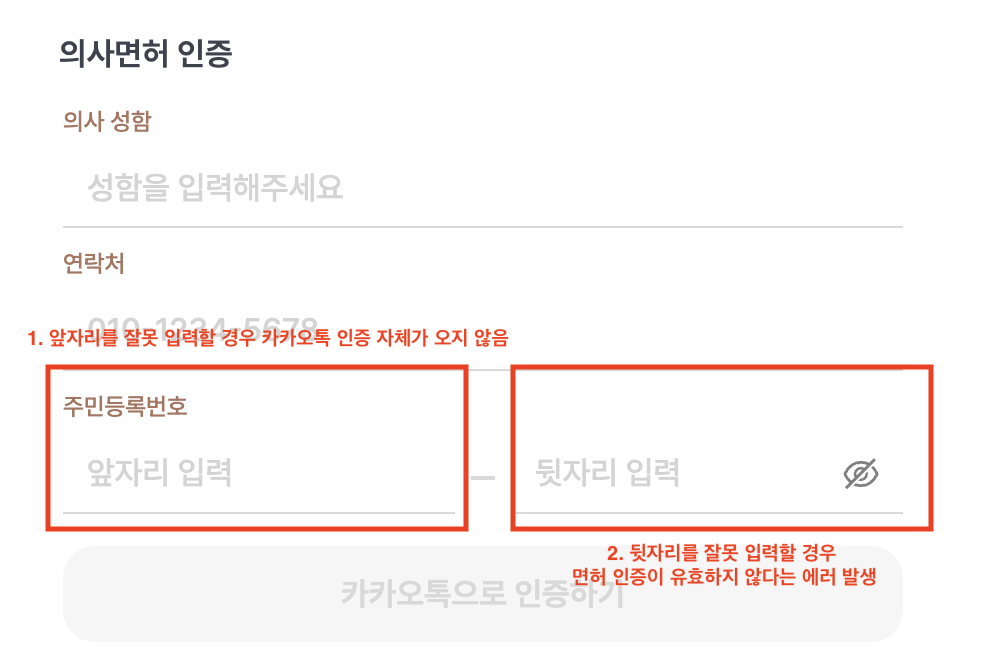
We tackled this on two fronts:
- Permanent fix: Requested that the third-party license verification API vendor add proper error handling
- Immediate action: Added a tooltip to the ID number input field with formatting guidance — coordinated with the designer and shipped it right away
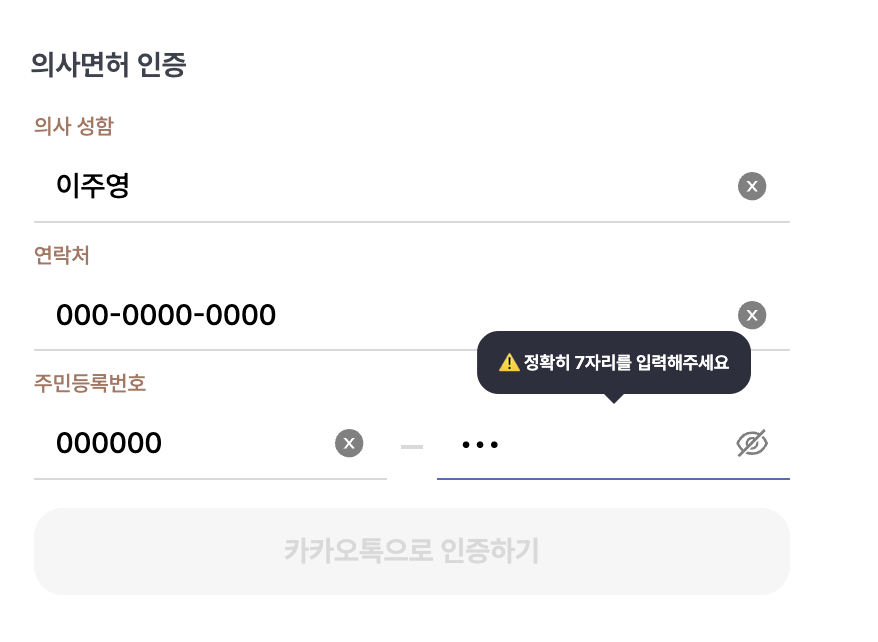
KakaoTalk inquiry comparison (before vs. after tooltip)
To measure the effect fairly, I needed to compare equal time windows under equal conditions. The OpenDoctor Web sign-up feature went live in production on January 19th, and the tooltip was deployed on February 13th. I sliced the KakaoTalk channel support data around those two dates.
| Period | Date Range | Related Inquiries |
|---|---|---|
| Before tooltip | Jan 19 – Feb 12 (25 days) | 7 |
| After tooltip | Feb 13 – Mar 9 (25 days) | 4 |
Over the same 25-day window, that's a roughly 43% reduction. The raw numbers aren't large, but as a stopgap before the vendor's permanent fix landed, I consider that a meaningful drop.
A note on methodology: I filtered for inquiries matching relevant keywords ("license verification," "resident registration number," etc.), and kept in mind that the Lunar New Year holiday period (Feb 8–10) overlapped with payment outage inquiries in the earlier window.
By March, license verification inquiries had stopped entirely — and that freed up meaningful response time.
Empty state improvement for the property listing
I had a chance to show OpenDoctor to a friend I'd recently gotten to know. It turned out his father was a doctor, so we ended up exploring the service together — looking back, that's a pretty funny situation.
But when we navigated to a particular area on the map, he said "it looks like something's broken." My heart sank.
I looked more carefully, and it wasn't actually an error. There just weren't any listings in that area, so it was showing "0 total listings." Functionally correct — but from a user's perspective, it looked like something had gone wrong.
So rather than simply showing an empty state message, I went a step further and proposed a feature: recommend areas or clinic-dense locations with the most active listings in real time, so users can jump there immediately. The proposal was accepted and I implemented it.
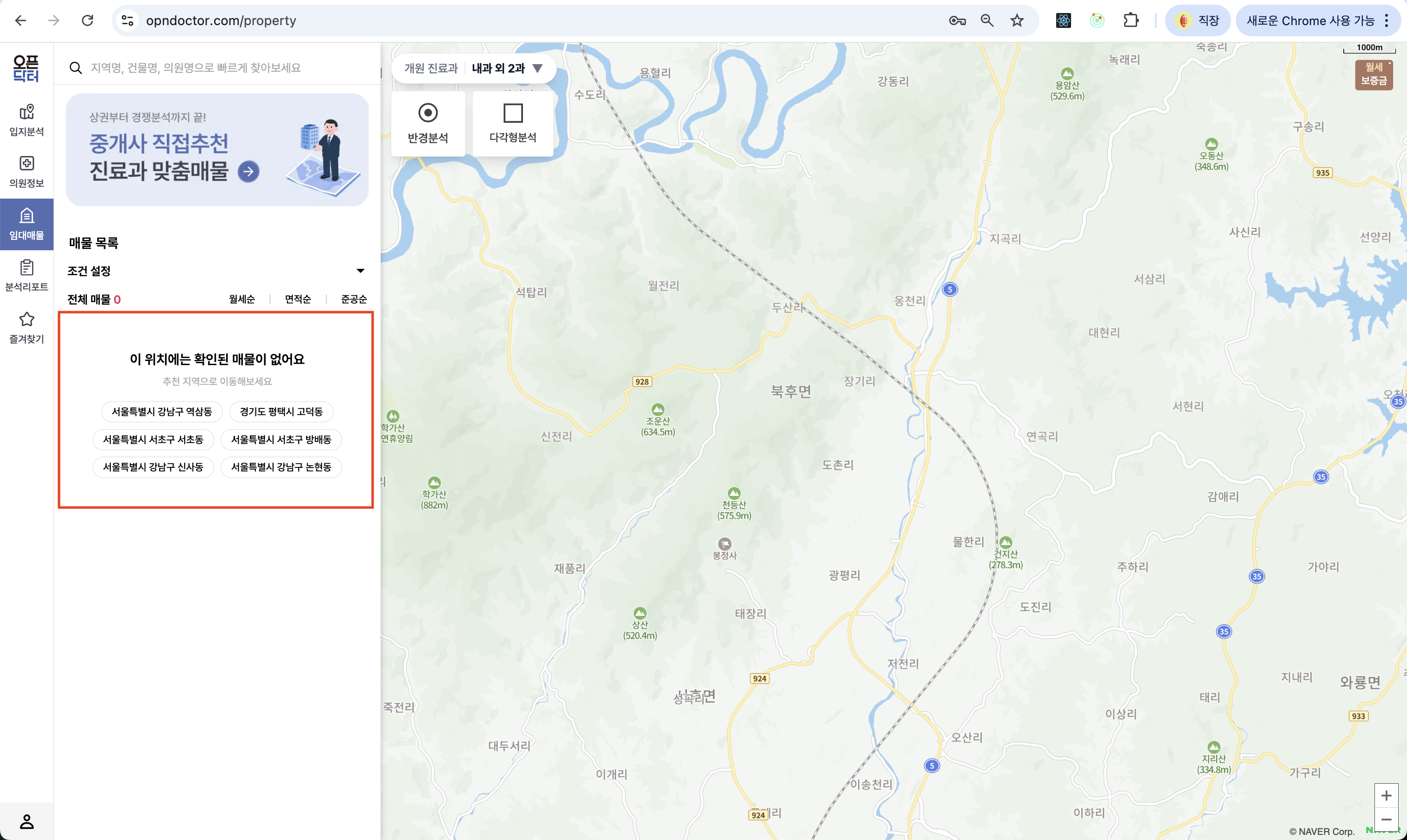
I also built the backend API for this — logic that returns the top 10 neighborhoods by listing count and clinic density. I wired that API to the frontend UI and shipped the full feature.
Wrapping Up
Every incident I dealt with in February traced back to cross-browser compatibility issues rooted in parent-child communication across iframes. It was a month of turning vague, half-formed concepts into concrete understanding through real problems.
The UI improvement work reinforced something else: that you can create meaningful change from outside the code too.
This retrospective ended up delayed all the way to April — but looking back with that distance, the events that mattered most are the ones that come into sharpest focus.
Next, I'll write up how we finally wrapped up the OpenDoctor Web migration in March.